
How to use NetMirror on PC & Mac
The full browser walkthrough — get the current working URL with one tap, solve a quick CAPTCHA, sign in once with email or Google, and start streaming. No install, no APK, no emulator. Works on Windows, Mac and Linux in any modern browser. ~90 seconds end-to-end.
The current working NetMirror URL
Copy the URL or open it directly. We update this page within hours of every rotation — bookmark this site (not the streaming URL) for one-click access to the latest URL.
Overview
Using NetMirror on a Windows PC or Mac is the simplest install experience of any platform — there\'s no install at all. The entire NetMirror streaming library runs as a web app in any modern browser. Open the current URL, verify the CAPTCHA, sign in with email or Google, and you\'re streaming. End-to-end: about 90 seconds.
The only quirk is that the streaming URL rotates every 4-6 weeks because ISPs in certain countries block the domain. We track every rotation and update this page within hours. Bookmark our site (not the streaming URL directly) — when the URL changes, your bookmark to this page keeps working and the URL card at the top always shows the latest.
Why the URL changes every month
ISPs in India (Jio, Airtel, BSNL, Vi) and a handful of other countries periodically block streaming aggregator domains at the DNS or BGP level. This isn\'t unique to NetMirror — every streaming aggregator deals with the same. To stay ahead of the blocks, the NetMirror team rotates the browser-facing URL every 4-6 weeks.
The native Android, iOS, Android TV and Firestick apps handle this rotation automatically — they check a registry endpoint on launch and switch domains without you noticing. Only the PC/Mac browser experience needs manual URL updates, which is exactly why we keep this page maintained.
Join our Telegram channel to get a notification within minutes of every URL rotation. You can also report bugs, request shows, and chat with other users.
Join Telegram · @netflix_mirror_apkBefore you start
You need four things. Most users have all four already — this is just a checklist.
Windows or Mac
Any Windows 7+ or macOS Intel / Apple Silicon
Modern browser
Chrome, Firefox, Edge or Safari — Chromium-based works best
Internet
Stable connection · 5 Mbps+ for HD, 25 Mbps+ for 4K
Email or Google
One-time sign-in only · no card, no phone number
Step-by-step walkthrough
4 steps · ~90 secFour steps, in order. Real browser screenshots for steps 2-4. Step 1 is just opening the URL above.
Open the current working URL
Copy the URL from the card above and paste it into your browser's address bar — or just tap the "Open in browser" button. The current NetMirror web URL is https://net77.cc.
This URL rotates every 4-6 weeks because of ISP-level blocks in certain countries. Don't bookmark the streaming URL directly — instead, bookmark this site (NetMirror) and we'll always have the current working URL one click away.
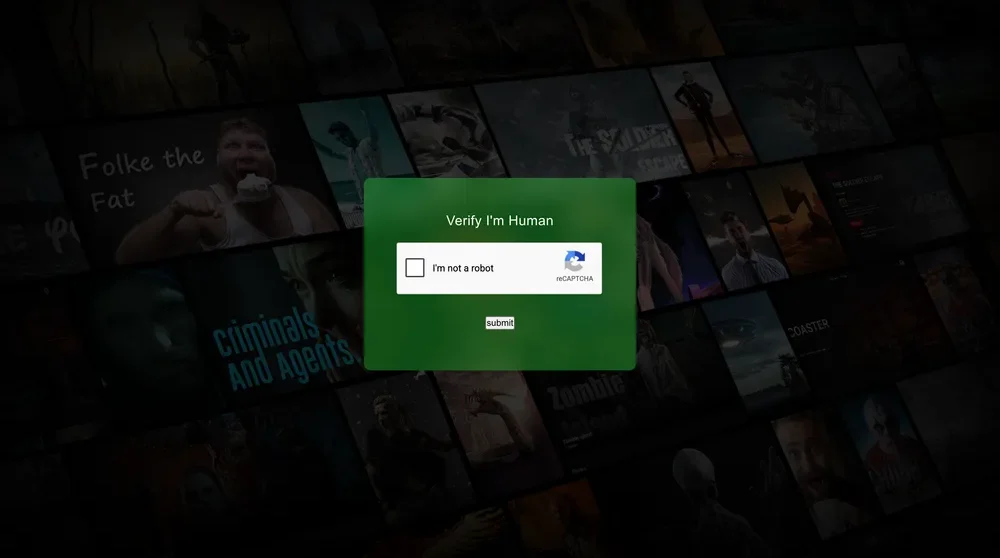
Verify "I'm not a robot"
The first thing you'll see on the streaming URL is a green "Verify I'm Human" card with a Google reCAPTCHA checkbox. This step exists to filter out bot/scraper traffic and protect the streaming infrastructure — not to track you.
Tick the "I'm not a robot" checkbox. If Google asks you to identify some images, complete the puzzle (usually one or two clicks). Then click the small Submit button below.
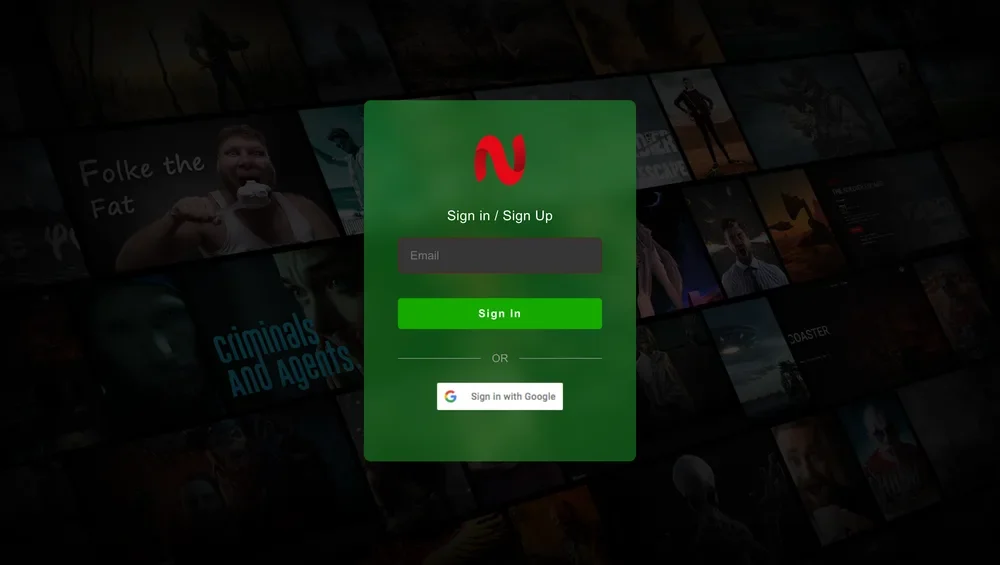
Sign in or sign up (one-time)
After the CAPTCHA you'll see the green NetMirror sign-in card. Enter your email in the field and click Sign In — you'll get a one-time code on your email to verify. Alternatively, click "Sign in with Google" for a one-click signup.
Signup takes about 30 seconds and exists for one reason only: so your watch progress, "Continue Watching" row and watchlist sync across browser sessions. No card, no phone number, no marketing emails. You can delete the account anytime.
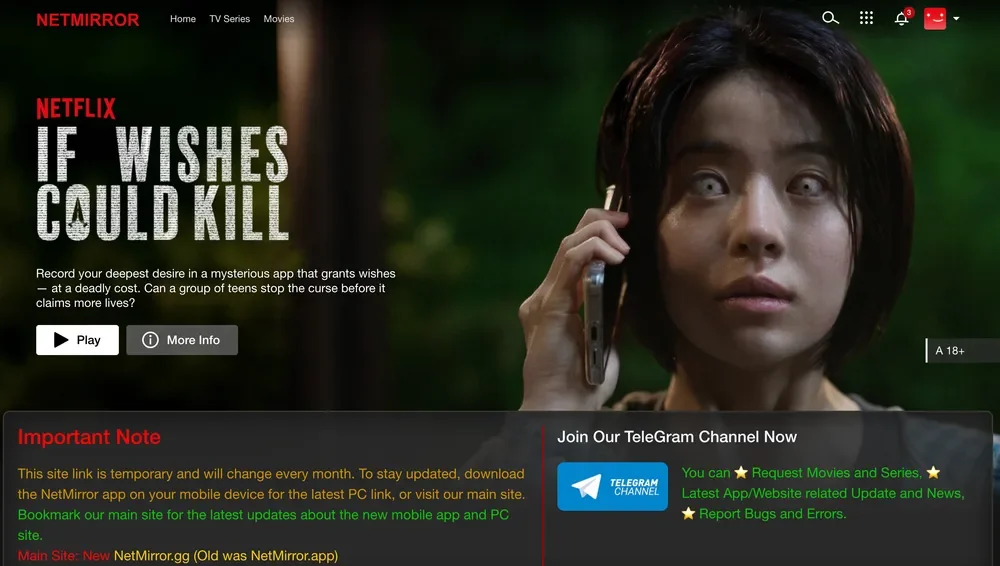
Browse 500K+ titles and start streaming
Once signed in, you land on the NetMirror home page — a clean Netflix-style web app. The featured banner shows the latest Netflix Original (here: If Wishes Could Kill). The top nav has Home, TV Series and Movies tabs. Search, app grid, notifications and profile sit top-right.
Click any title to open its detail page with Play, More Info and language/quality options. Movies and TV series stream up to 4K UHD on capable monitors, with multi-language audio and 50+ language subtitle support — same content library as the Android/iOS apps.
You\'re streaming on PC.
500K+ titles across 50+ OTT platforms, up to 4K UHD. Picture-in-Picture supported in Chrome and Edge — right-click the video twice for the native PiP menu. Cast to Chromecast or AirPlay from the browser tab.
Bookmark this site, not the URL
The biggest mistake PC users make is bookmarking the streaming URL directly. When it rotates a month later, your bookmark dies and you\'re stuck. Bookmark this page instead — the URL card at the top always shows the latest working address.
Troubleshooting
6 common issues · verified fixesThe six most common browser-side issues — what causes each and the verified fix.
Browser shows "This site can't be reached" or DNS error
The URL has rotated to a new domain — your ISP is blocking the old one.
Come back to this site (NetMirror) — we always publish the current working URL at the top of this page. Copy the new URL using the Copy button. If you bookmarked this page, the bookmark stays valid even when the streaming URL changes.
reCAPTCHA fails or keeps asking for image puzzles
You're on a VPN, in incognito mode, or your IP has been flagged by Google reCAPTCHA.
Pause your VPN (or switch to a different VPN server in a less-flagged country), exit incognito mode, or try a different browser. The CAPTCHA usually succeeds on a normal Chrome session with cookies enabled within 1-2 clicks.
Sign-in email never arrives
The verification email was filtered into Spam, or the email server temporarily delayed delivery.
Check your Spam / Junk folder for an email from noreply@netmirror. If still missing after 5 minutes, click "Resend" on the sign-in screen, or try "Sign in with Google" instead — Google sign-in is instant.
Video player shows a black screen or "playback error"
Browser extensions (especially aggressive ad-blockers or privacy plugins) sometimes break the embedded player.
Open the URL in a new incognito window — extensions are disabled by default in incognito. If playback works there, whitelist NetMirror in your ad-blocker. Common culprits: uBlock Origin, Privacy Badger, Ghostery.
Quality keeps dropping to 360p / 480p
Either your connection is slow, or auto-quality is misjudging your bandwidth.
Click the gear icon in the player and manually set the quality to 1080p or 4K. Run speedtest.net — you need 5 Mbps+ for HD, 25 Mbps+ for 4K. If on Wi-Fi, switch to Ethernet for the most reliable playback.
Picture-in-Picture button doesn't appear
PiP requires Chrome 70+, Edge 79+ or Firefox 71+. Safari supports PiP only on macOS 10.12+.
Update your browser to the latest version. In Chrome / Edge, you can also force PiP by right-clicking the video twice (the second right-click reveals Chrome's native PiP menu).
PC & Mac install FAQ
Eight questions browser users ask most often.
Do I need to install anything to use NetMirror on PC?
Why does the URL change every month?
How do I know the URL on this page is the latest?
Is signing in safe? What data do they collect?
Can I use NetMirror PC on a work / school network?
Does it work on Linux?
Can I cast PC playback to a Smart TV or Chromecast?
How do I sign out / delete my account?
Ready to stream?
Copy the URL above (or tap Open) — Step 1 done. Three more clicks and you\'re watching.